Grasshopper Integration¤
Note
This tutorial assumes that you have already installed compas_eve.
If you haven't, please follow the instructions in the installation section.
COMPAS EVE provides tools to work with events inside Rhino/Grasshopper, as well as the ability to run long-running tasks in the background, which would otherwise block the UI.
Long-running tasks¤
A long-running task is any snippet of code that takes a long time to execute. Normally, this would freeze the Grasshopper user interface. COMPAS EVE provides a mechanism to run such tasks in the background, so that the user can continue working with Grasshopper while the task is running.
In order to use it, add a Background task component to your Grasshopper definition, and connect
an input with a python function containing the code that needs to run in the background. The only
requirement is that this function must accept a worker argument, which is an instance of
BackgroundWorker.
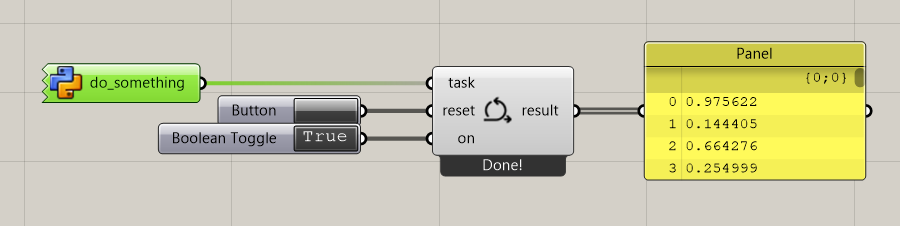
The following code exemplifies how to use it to create a simple background task that generates a list of random values. The function adds some delay to simulate a long-running task.
    import time
    import random

    def do_something(worker):
        result = []

        for i in range(100):
            result.append(random.random())
            worker.display_progress(len(result) / 100)
            time.sleep(0.05)

        worker.display_message("Done!")

        return result
It is also possible to update the results during the execution of the task. The result can be of any type, in the previous example it was a list of numbers.
In the following example, the code generates a list of randomly placed Rhino points and continuously updates the results as the list grows. The points will appear in the Rhino Viewport even before the task has completed.
    import time
    import random
    import Rhino.Geometry as rg

    def do_something(worker):
        result = []

        for i in range(100):
            x, y = random.randint(0, 100), random.randint(0, 100)
            result.append(rg.Point3d(x, y, 0))
            worker.update_result(result)
            time.sleep(0.01)

        worker.display_message("Done!")

        return result
Components¤
The following components are available in Grasshopper:
| Icon | Component | Description |
|---|---|---|
 |
MqttConnect |
Connects to an MQTT broker. |
 |
ZenohConnect |
Connects to a Zenoh router. |
 |
Message |
Creates a new compas_eve message. |
 |
Publish |
Publishes a message to a specific topic. |
 |
Subscribe |
Subscribes to a specific topic. |
 |
BackgroundTask |
Runs a function continuously in the background. |