Tutorial: Build a Plugin¤
This tutorial builds Notes, a plugin that lets the user attach a short note to any object in the viewer. Along the way it uses every part of a plugin:
- a toolbar button with a keyboard shortcut (clear all notes),
- an object action in the picked object's panel (add or edit its note),
- a panel listing every note,
- a Python half that owns the notes, so every browser tab sees the same list, a reload keeps it, and a script can read and write notes.
Read How Plugins Work first if you haven't: it explains the pieces this tutorial puts together.
What you need
Python with compas_threejs installed, and Node.js 22.12 or
newer to build the frontend. People who install your plugin later need neither
Node.js nor a build step: the wheel carries the built files.
1. The project layout¤
compas_threejs_notes/
├── frontend/                  # the TypeScript half, built with Vite
│   ├── index.ts               #   definePlugin(...): the plugin's entry point
│   ├── notes.ts               #   state shared by the components
│   ├── ClearButton.vue        #   toolbar button
│   ├── NoteAction.vue         #   object action
│   ├── NotesPanel.vue         #   panel
│   ├── style.css, tailwind.css, theme.css, env.d.ts
├── src/compas_threejs_notes/  # the Python half
│   ├── __init__.py            #   class Notes(Plugin)
│   └── static/                #   built by `npm run build` - not committed
├── examples/notes.py
├── tests/test_notes.py
├── vendor/                    # the viewer package, see below
├── package.json, vite.config.ts, tsconfig.json
└── pyproject.toml
The build writes the frontend into the Python package (src/compas_threejs_notes/static/),
and pyproject.toml ships that folder in the wheel.
flowchart LR
    fe["frontend/*.ts, *.vue"] -- "npm run build<br/>(Vite)" --> st["src/compas_threejs_notes/static/<br/>plugin.js + plugin.css"]
    py["src/compas_threejs_notes/__init__.py"] --> wheel["wheel"]
    st --> wheel
    wheel -- "pip install" --> user["user's Python env"]
Tip
The quickest start is to copy an existing plugin, such as compas_threejs_views,
and rename it. The files below are complete, so you can also start from an empty
folder.
2. The frontend toolchain¤
package.json¤
{
  "name": "compas-threejs-notes",
  "private": true,
  "type": "module",
  "scripts": {
    "build": "vite build",
    "watch": "vite build --watch",
    "typecheck": "vue-tsc --noEmit"
  },
  "devDependencies": {
    "@compas-dev/compas-threejs-ts": "file:vendor/compas-dev-compas-threejs-ts-1.5.0.tgz",
    "@tailwindcss/vite": "^4.3.3",
    "@vitejs/plugin-vue": "^6.0.8",
    "lucide-vue-next": "^0.563.0",
    "tailwindcss": "^4.3.3",
    "typescript": "~5.9.3",
    "vite": "^8.2.1",
    "vue": "^3.5.41",
    "vue-tsc": "^3.3.9"
  }
}
@compas-dev/compas-threejs-ts provides definePlugin, useViewer, the UI components
and their types.
Getting the viewer package
Until a release of @compas-dev/compas-threejs-ts with the plugin API is on npm,
plugins use a packed copy. In a checkout of compas_threejs_ts on the plugin branch,
run npm run build and then npm pack, and copy the .tgz into your vendor/
folder. Repack after the viewer's API changes.
vite.config.ts¤
// Builds the plugin into the Python package, as src/compas_threejs_notes/static/plugin.js
// (+ plugin.css), which ships in the wheel. "vue", "three" and the viewer API stay
// imports: the viewer page provides them through its import map.
import path from "node:path";
import tailwindcss from "@tailwindcss/vite";
import vue from "@vitejs/plugin-vue";
import { defineConfig } from "vite";

export default defineConfig({
  plugins: [vue(), tailwindcss()],
  define: { "process.env.NODE_ENV": JSON.stringify("production") },
  build: {
    outDir: path.resolve(
      import.meta.dirname,
      "src/compas_threejs_notes/static",
    ),
    emptyOutDir: true,
    lib: {
      entry: path.resolve(import.meta.dirname, "frontend/index.ts"),
      formats: ["es"],
      fileName: () => "plugin.js",
      cssFileName: "plugin",
    },
    rollupOptions: {
      external: ["vue", "three", "@compas-dev/compas-threejs-ts"],
    },
  },
});
Three settings matter:
fileName: () => "plugin.js"andcssFileName: "plugin"- the names Python serves.formats: ["es"]- the page loads the plugin withimport().external- required. A plugin that bundles its own Vue gets a second Vue, anduseViewer()fails with "must be called inside a viewer component".
Styles and types¤
The viewer is styled with Tailwind; a plugin gets only the utility classes its own
components use, plus the viewer's colour tokens (bg-secondary,
text-muted-foreground, ...), which follow the light and dark theme.
/* Only the utilities a plugin's own components use; the page already has the base styles. */
@import "tailwindcss/theme.css" layer(theme);
@import "tailwindcss/utilities.css" layer(utilities) source(none);
@import "./theme.css";
Copy frontend/theme.css (the viewer's theme tokens) from compas_threejs_views or
compas_threejs_essentials.
declare module "*.vue" {
  import type { DefineComponent } from "vue";
  const component: DefineComponent;
  export default component;
}
{
  "compilerOptions": {
    "target": "ES2022",
    "module": "ESNext",
    "moduleResolution": "bundler",
    "strict": true,
    "noEmit": true,
    "skipLibCheck": true,
    "lib": ["ES2022", "DOM", "DOM.Iterable"],
    "types": ["vite/client"]
  },
  "include": ["frontend/**/*.ts", "frontend/**/*.vue"]
}
Install the dependencies once:
3. The Python half¤
Start with Python: it decides what the plugin is. Python owns the notes; the browser asks for changes and shows what Python sends back.
from pathlib import Path

from compas_threejs.viewer import Plugin
from compas_threejs.viewer import action


class Notes(Plugin):
    """Notes on the viewer's objects, kept in Python.

    The user adds a note to the picked object from its panel; the Notes panel lists them
    all, in every browser tab. A script reads them in `notes` and writes them with `write`.

    Groups and buttons: ``edit`` (``clear``); object action ``note``; panel ``list``.
    E.g. ``notes.disable("clear")``.
    """

    name = "notes"
    static = Path(__file__).parent / "static"
    ids = ("edit", "clear", "note", "list")

    def __init__(self):
        super().__init__()
        self._notes = {}  # guid -> (geometry, text)

    @property
    def notes(self):
        """The notes, as ``(geometry, text)`` pairs."""
        return list(self._notes.values())

    @action("write")
    def _write(self, data, workspace):
        geometry = self.app.find_geometry(data["guid"])
        if geometry is not None:
            self.write(geometry, data["text"])

    @action("clear")
    def _clear(self, data, workspace):
        self.clear()
        self.notify("Notes cleared")

    def write(self, geometry, text):
        """Sets the note of `geometry`; an empty `text` deletes it."""
        text = text.strip()
        if text:
            self._notes[str(geometry.guid)] = (geometry, text)
        else:
            self._notes.pop(str(geometry.guid), None)
        self._send_notes()

    def clear(self):
        """Deletes every note."""
        self._notes.clear()
        self._send_notes()

    def attached(self):
        super().attached()
        self._send_notes()  # notes written before the plugin was added to the App

    def _send_notes(self):
        if not self.app:
            return
        notes = [{"guid": guid, "name": geometry.name, "text": text} for guid, (geometry, text) in self._notes.items()]
        # key: tabs opened later, and reloads, get the latest list too.
        self.send_all("notes", notes, key="notes")


__all__ = ["Notes"]
Line by line:
name = "notes"- The plugin's identity. The frontend uses the same string in
definePluginanduseChannel, and the files are served under/plugins/notes/. static- The folder holding the built
plugin.js.App.start()raises if it's missing, with a hint to runnpm run build. ids- Every id the frontend declares. Optional, but with it
notes.hide("clean")raises instead of silently doing nothing. @action("write")- Handles the frontend's
channel.send("write", data). Handlers always get(data, workspace): the JSON data, and theWorkspaceof the tab that sent it. self.app.find_geometry(guid)- The frontend knows objects by guid; this turns one back into the COMPAS geometry.
send_all("notes", ..., key="notes")- Sends the whole list to every tab. The
keymakes the server keep the latest message and replay it to tabs that connect later. Usesendinstead to answer only the tab that asked. attached()- Called when the plugin is added to an
App. Before that there is noself.appto send through, sowritebeforeapp.plugins = [...]just stores the note. self.notify(...)- A short message at the bottom of the view, in the tab that asked.
For how @action and notes.on work under the hood, see
The Python Half, Explained.
COMPAS geometry is not hashable
Keep geometry in lists or key dictionaries by str(geometry.guid), as above -
{geometry: text} raises TypeError: unhashable type.
pyproject.toml¤
[build-system]
requires = ["setuptools>=66"]
build-backend = "setuptools.build_meta"

[project]
name = "compas_threejs_notes"
version = "0.1.0"
description = "Notes on the objects of the compas_threejs viewer, kept in Python"
requires-python = ">=3.10"
dependencies = ["compas_threejs"]

[tool.setuptools.packages.find]
where = ["src"]

# The built frontend (npm run build) ships inside the wheel.
[tool.setuptools.package-data]
"*" = ["static/*"]
4. The frontend¤
Shared state: notes.ts¤
Three components show the notes. They read one reactive list, which setup fills with
what Python sends.
import { ref } from "vue";

export interface Note {
  guid: string;
  name: string;
  text: string;
}

/** The notes, as Python last sent them. Every component of the plugin reads this one list. */
export const notes = ref<Note[]>([]);
The entry point: index.ts¤
plugin.js must default-export the result of definePlugin.
import { definePlugin } from "@compas-dev/compas-threejs-ts";

import "./style.css";
import { notes, type Note } from "./notes";
import ClearButton from "./ClearButton.vue";
import NoteAction from "./NoteAction.vue";
import NotesPanel from "./NotesPanel.vue";

export default definePlugin({
  name: "notes",
  title: "Notes",
  // Ids are what Python hides or disables: notes.disable("clear")
  groups: {
    edit: { clear: ClearButton },
  },
  objectActions: {
    note: NoteAction,
  },
  panels: {
    list: { component: NotesPanel, title: "Notes" },
  },
  setup(viewer) {
    // Python owns the notes and sends the whole list whenever it changes.
    return viewer.channel("notes").on("notes", (data) => {
      notes.value = (data as Note[] | null) ?? [];
    });
  },
});
groupsmaps group ids to buttons by id, in toolbar order. Each group is drawn as one shaded segment.objectActionsappear in the Actions panel while an object is picked.panelswith atitleget a frame whose title bar folds them;sideis"right"by default,"left"under the toolbar, or"top"/"bottom"for a row along that edge of the view.setupruns once, before the viewer mounts.channel.onreturns an unsubscribe function, which doubles assetup's cleanup.
Subscribing in setup rather than in the panel means the list is up to date even
while the panel is hidden or folded. The Frontend Half, Explained
explains why, along with the rest of what happens on this side.
A toolbar button: ClearButton.vue¤
<template>
  <ToolbarButton tooltip="Clear all notes" shortcut="N" @click="clear">
    <Eraser />
  </ToolbarButton>
</template>

<script setup lang="ts">
import {
  ToolbarButton,
  useChannel,
  useShortcuts,
} from "@compas-dev/compas-threejs-ts";
import { Eraser } from "lucide-vue-next";

const channel = useChannel("notes");
const clear = () => channel.send("clear");

useShortcuts({ n: clear });
</script>
ToolbarButton looks like the viewer's own buttons, shows the tooltip with the
shortcut, and greys itself out when Python disables it. useShortcuts binds lower-case
event.keys while the component is mounted; it stands down while the button is
disabled, while the user types in a field, and while another plugin holds input (a
drawing tool, for instance). useChannel is the component version of
viewer.channel: its on handlers are removed with the component.
An object action: NoteAction.vue¤
<template>
  <Button variant="secondary" class="w-full" @click="edit">
    <StickyNote class="size-4" />
    {{ current ? "Edit note" : "Add note" }}
  </Button>
</template>

<script setup lang="ts">
import { Button, useChannel, useViewer } from "@compas-dev/compas-threejs-ts";
import { StickyNote } from "lucide-vue-next";
import { computed } from "vue";

import { notes } from "./notes";

const viewer = useViewer();
const channel = useChannel("notes");

// The picked object's note, if it has one.
const current = computed(() => {
  const guid = viewer.state.selectedGuid.value;
  return notes.value.find((note) => note.guid === guid);
});

function edit() {
  const guid = viewer.state.selectedGuid.value;
  if (!guid) return;
  const text = window.prompt("Note", current.value?.text ?? "");
  if (text === null) return;
  // Python stores it and sends the new list back; an empty text deletes the note.
  channel.send("write", { guid, text });
}
</script>
The component doesn't update notes itself: it sends the request and waits for
Python's answer. That round trip is fast, and it means there is only one source of
truth.
A panel: NotesPanel.vue¤
<template>
  <p v-if="!notes.length" class="text-muted-foreground text-sm">
    No notes yet: pick an object and add one.
  </p>
  <ul v-else class="flex flex-col gap-2 text-sm">
    <li
      v-for="note in notes"
      :key="note.guid"
      class="rounded-md px-2 py-1"
      :class="{ 'bg-secondary': note.guid === selected }"
    >
      <div class="text-muted-foreground text-xs">{{ note.name }}</div>
      {{ note.text }}
    </li>
  </ul>
</template>

<script setup lang="ts">
import { useViewer } from "@compas-dev/compas-threejs-ts";
import { computed } from "vue";

import { notes } from "./notes";

const viewer = useViewer();
const selected = computed(() => viewer.state.selectedGuid.value);
</script>
viewer.state is reactive, so the picked object's note is highlighted as the
selection changes.
5. Build and install¤
npm run build        # writes src/compas_threejs_notes/static/plugin.js + plugin.css
npm run typecheck    # optional: vue-tsc over the frontend
pip install -e .     # the Python half, editable
Add src/compas_threejs_notes/static/ to .gitignore: it is a build output, rebuilt
before packaging the wheel.
6. Use it¤
from compas.geometry import Box
from compas.geometry import Sphere

from compas_threejs.viewer import App
from compas_threejs_notes import Notes

app = App()
notes = Notes()
app.plugins = [notes]

box = Box(2, 2, 2)
box.name = "Box"
sphere = Sphere(1, point=[4, 0, 0])
sphere.name = "Sphere"
app.add_geometry(box)
app.add_geometry(sphere)

notes.write(box, "Check the dimensions")


@notes.on("write")
def written(data, workspace):
    print(f"{workspace.workspace_id}: {len(notes.notes)} notes")


app.start()
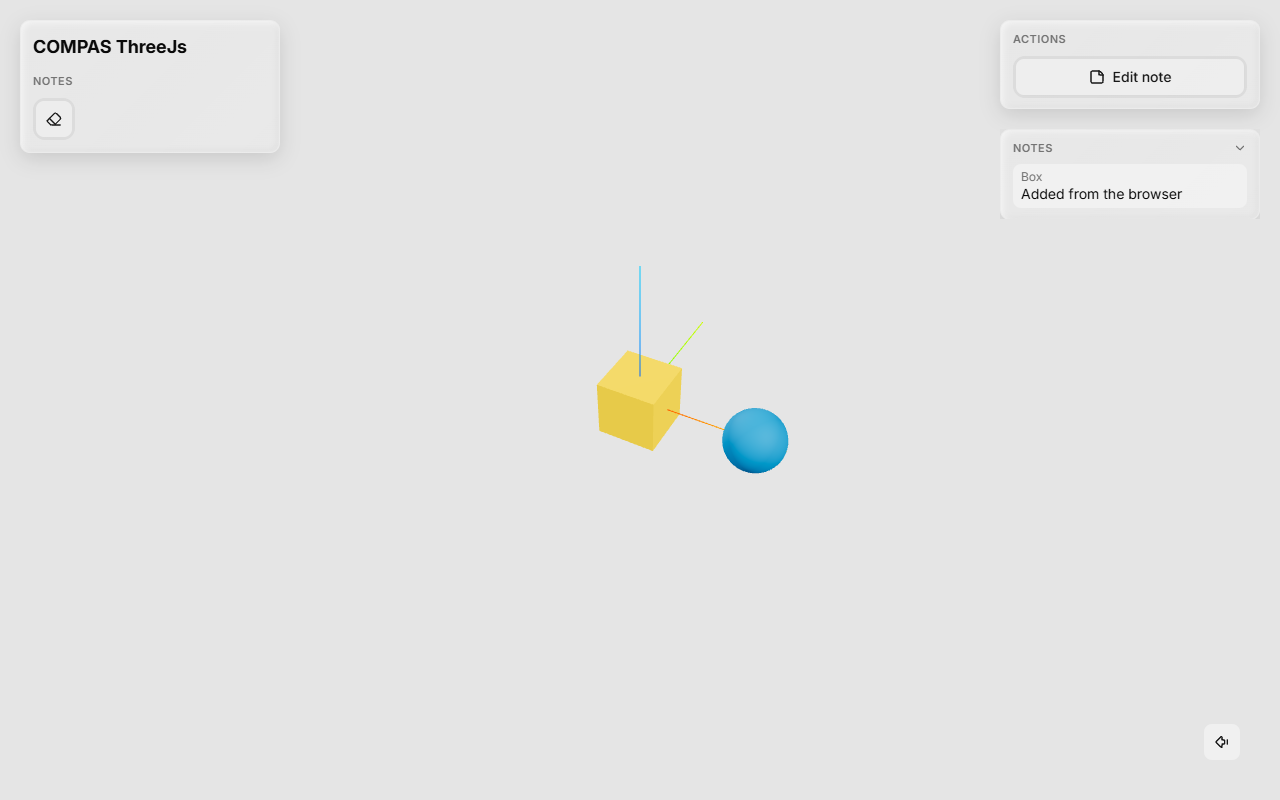
Run it: the Notes panel already shows the script's note. Pick an object and choose Add note in its panel; press N to clear them all. Open the same URL in a second tab: both show the same notes.
notes.on("write") adds a handler from outside the plugin; it runs after the
plugin's own. Combine plugins as usual - app.plugins = [Essentials(), Views(), notes] -
and control them from the script:
notes.disable("clear")   # read-only: the button greys out, N does nothing
notes.hide("list")       # no panel
The development loop¤
Reload the browser tab to get the new build: the plugin's URL carries the file's modification time, so the browser doesn't use a stale copy. Changes to the Python half need the script restarted.
7. Test the Python half¤
Python can be tested without a browser: deliver messages as the frontend would, and read what the plugin sends from the app's outbox.
import json

import compas_pb
import pytest
from compas.geometry import Box

from compas_threejs.viewer import App
from compas_threejs_notes import Notes


def receive(app, action, data=None):
    """Delivers a message as the frontend's `channel.send(action, data)` would."""
    message = {"dispatch": "plugin", "plugin": "notes", "action": action, "data": data}
    app.on_message(json.dumps(message).encode("utf-8"))


def last_sent(app):
    return compas_pb.pb_load_bts(app.outbox._queue[-1][0])


def test_a_note_from_the_browser_is_stored_and_sent_back():
    app = App()
    notes = Notes()
    app.plugins = [notes]
    box = Box(1)
    app.add_geometry(box)

    receive(app, "write", {"guid": str(box.guid), "text": "Too small"})

    assert notes.notes == [(box, "Too small")]
    sent = last_sent(app)
    assert sent["action"] == "notes"
    assert sent["data"][0]["text"] == "Too small"


def test_an_empty_note_deletes_it():
    app = App()
    notes = Notes()
    app.plugins = [notes]
    box = Box(1)
    notes.write(box, "Too small")
    notes.write(box, "  ")
    assert notes.notes == []


def test_ids_are_checked():
    notes = Notes()
    notes.disable("clear")
    assert notes.disabled == {"clear"}
    with pytest.raises(ValueError):
        notes.hide("clean")
8. Troubleshooting¤
| Symptom | Cause |
|---|---|
FileNotFoundError: Plugin 'notes' has no built frontend |
Run npm run build; check static points at the build's outDir. |
| The section doesn't appear; the browser console says Unable to load the "notes" plugin | plugin.js failed to import - look at the error below it. Often a missing default export. |
| useViewer() must be called inside a viewer component | Vue was bundled into plugin.js; keep vue, three and the viewer package external. |
| The "notes" plugin uses the id "…" twice: it was not loaded (error notice) | A duplicate id within one plugin, or two plugins with the same name. |
| The "notes" plugin was not loaded: its setup failed | setup threw - the browser console has the stack. |
| A ! mark instead of a button or panel | That component threw while it set up or drew. |
| Plugin 'notes' failed on 'write': … (error notice) | A Python handler raised - the traceback is in the Python log. |
| Plugin 'notes' has no handler for 'write' (Python log) | The action names on both sides differ. |
TypeError in a handler with one argument |
Handlers take (data, workspace). |
| A plugin class looks wrong (no colours) | theme.css is missing, or a class is built from strings Tailwind can't see. |
Where to go from here¤
- Interactive tools (a gizmo, drawing):
viewer.threegives the camera, pointer rays, overlays andbeginInteraction, which takes over pointer and keyboard input. The frontend page adds a measuring tool to Notes;compas_threejs_essentials(gizmo) andcompas_threejs_drawgo further. - A plugin that other plugins use: export an
apifromdefinePlugin; others callviewer.plugin("notes"). - Tabs of their own:
viewer.workspaceUrl(id)andPlugin.new_workspace. - The full Python API: Plugin reference.