Boolean Chain with Face Source Tracking¤
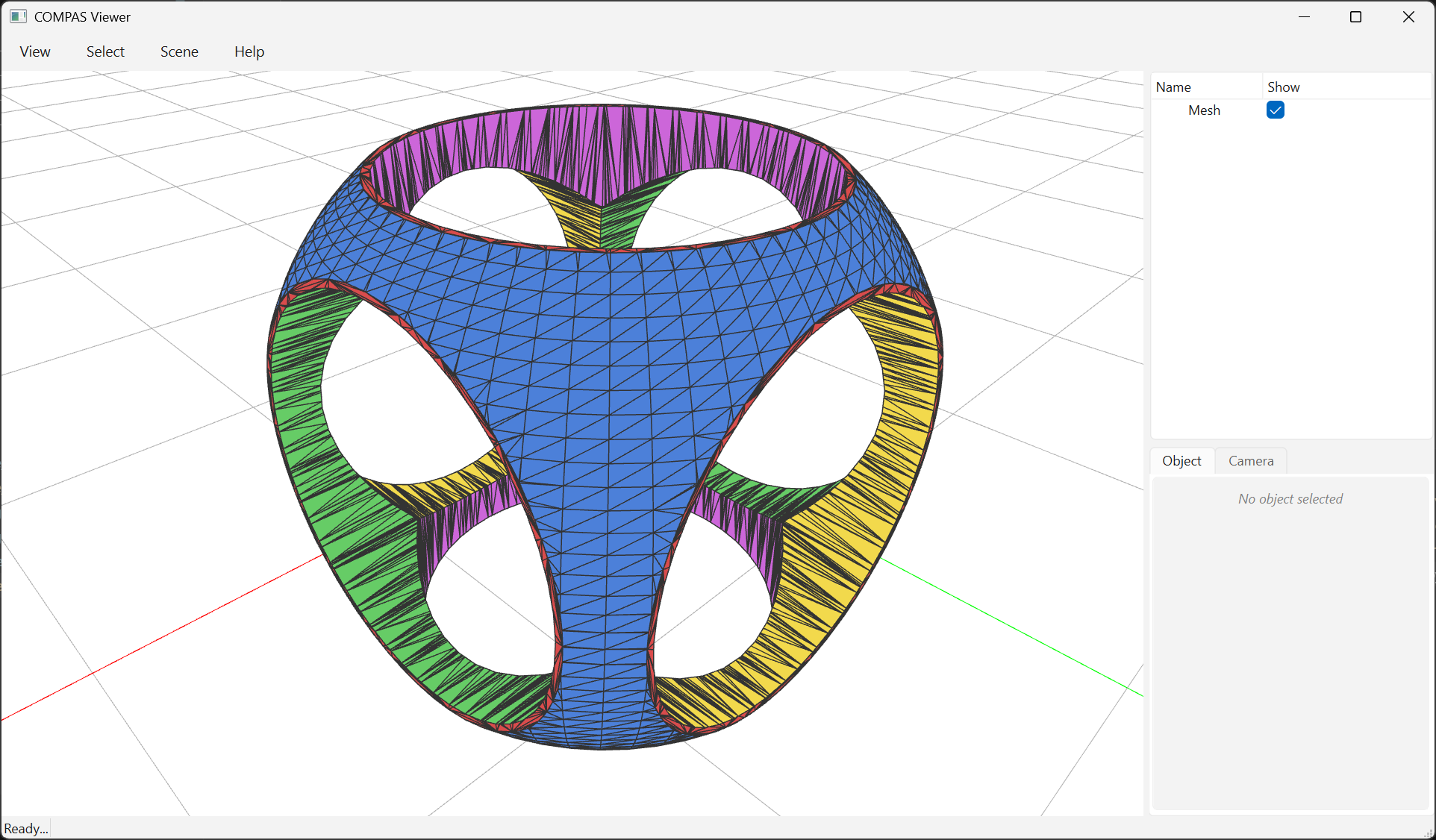
This is the same CSG as
Boolean Difference With Many Cutters
— cube ∩ sphere − cyl_x − cyl_y − cyl_z — but with every output face
colored by which of the five input meshes it descended from.
Color legend:
mesh_id |
input mesh | color |
|---|---|---|
| 0 | cube | red |
| 1 | sphere | blue |
| 2 | cyl_x | green |
| 3 | cyl_y | yellow |
| 4 | cyl_z | magenta |
boolean_chain_with_face_source returns (V, F, S):
V—Nx3vertex coordinatesF—Mx3triangle face indicesS—Mx2int array;S[i] = [mesh_id, face_id]for output facei, pointing back to the original input face it descended from.
Tracking is done via a CGAL corefinement visitor that propagates per-face tags through subface creations and face copies.
Why slight cylinder offsets?¤
The companion example Boolean Difference With Many Cutters uses CGAL 6.1's autorefine_triangle_soup snap rounding between corefinement steps to repair rounding-induced degeneracies — that's how it handles three cylinders converging at the origin without crashing.
The *_with_face_source chain cannot use that pipeline: the visitor's
per-face property maps don't survive the soup conversion. So instead, this
example shifts each cylinder by a fraction of a millimetre perpendicular to
its axis, breaking the exact three-way intersection at the origin while
remaining visually indistinguishable from the snap-rounded version.
If you don't need source tracking and want exactly-axial cylinders, use
boolean_chain instead.
from compas.colors import Color
from compas.datastructures import Mesh
from compas.geometry import Box
from compas.geometry import Cylinder
from compas.geometry import Frame
from compas.geometry import Sphere
from compas_viewer import Viewer

from compas_cgal.booleans import boolean_chain_with_face_source
from compas_cgal.booleans import split_by_source


# =============================================================================
# Same CSG as example_boolean_difference_mesh_meshes.py, but every output face
# is colored by which input mesh it descended from.
#
#     result = cube ∩ sphere − cyl_x − cyl_y − cyl_z
#
# All five input meshes go to C++ in a single boolean_chain_with_face_source
# call. A CGAL corefinement visitor propagates a per-face tag through every
# step so every output triangle carries [mesh_id, face_id] of its origin.
#
# The chain runs in CGAL's exact-constructions kernel (EPECK), which
# handles the degenerate triple intersection where the three axis-aligned
# cylinders meet at the origin without any geometric workarounds. Pass
# `hybrid=True` to switch to the EPICK mesh + EPECK vertex_point_map
# scheme from CGAL's "consecutive boolean operations with exact point
# maps" example.
# =============================================================================

cube = Box(2).to_vertices_and_faces(triangulated=True)
sphere = Sphere(1.3, point=[0, 0, 0]).to_vertices_and_faces(u=64, v=64, triangulated=True)


def cylinder_along(axis, radius=0.8):
    """Cylinder of length 4 along a world axis, centred at the origin."""
    if axis == "x":
        frame = Frame([0, 0, 0], [0, 1, 0], [0, 0, 1])
    elif axis == "y":
        frame = Frame([0, 0, 0], [0, 0, 1], [1, 0, 0])
    else:  # "z"
        frame = Frame([0, 0, 0], [1, 0, 0], [0, 1, 0])
    return Cylinder(radius, 4.0, frame).to_vertices_and_faces(u=48, triangulated=True)


cyl_x = cylinder_along("x")
cyl_y = cylinder_along("y")
cyl_z = cylinder_along("z")

V, F, S = boolean_chain_with_face_source(
    [cube, sphere, cyl_x, cyl_y, cyl_z],
    ["intersection", "difference", "difference", "difference"],
)

# =============================================================================
# Color the output by source mesh:
#   mesh_id == 0  -> cube     (red)
#   mesh_id == 1  -> sphere   (blue)        — rounded corners/edges
#   mesh_id == 2  -> cyl_x    (green)       — X-axis through-hole walls
#   mesh_id == 3  -> cyl_y    (yellow)      — Y-axis through-hole walls
#   mesh_id == 4  -> cyl_z    (magenta)     — Z-axis through-hole walls
#
# Two equivalent visualization paths are shown below. Pick whichever fits
# your downstream code; the C++ output is identical in both cases.
# =============================================================================

palette = {
    0: Color(0.85, 0.30, 0.30),
    1: Color(0.30, 0.50, 0.85),
    2: Color(0.40, 0.80, 0.40),
    3: Color(0.95, 0.85, 0.30),
    4: Color(0.80, 0.40, 0.85),
}

# Option A — single connected mesh + per-face color dict (keeps shared
# vertices intact at source boundaries; best for further processing).
mesh = Mesh.from_vertices_and_faces(V, F)
facecolor = {fkey: palette[mesh_id] for fkey, (mesh_id, _) in zip(mesh.faces(), S.tolist())}

# Option B — split into one mesh per source via split_by_source. Each
# submesh is independent (boundary vertices are duplicated across submeshes)
# and gets its own scene object with a single color. Convenient for viewers
# that prefer one material/layer per object.
submeshes = {mesh_id: Mesh.from_vertices_and_faces(Vs, Fs) for mesh_id, (Vs, Fs) in split_by_source(V, F, S).items()}

# =============================================================================
# Visualize — toggle USE_SPLIT to compare the two paths.
# =============================================================================

USE_SPLIT = True

viewer = Viewer()
if USE_SPLIT:
    for mesh_id, submesh in submeshes.items():
        viewer.scene.add(
            submesh,
            facecolor=palette[mesh_id],
            lineswidth=1,
            show_points=False,
            show_lines=True,
        )
else:
    viewer.scene.add(mesh, facecolor=facecolor, lineswidth=1, show_points=False, show_lines=True)
viewer.show()