Straight Skeleton Extrusion (Roofs)¤
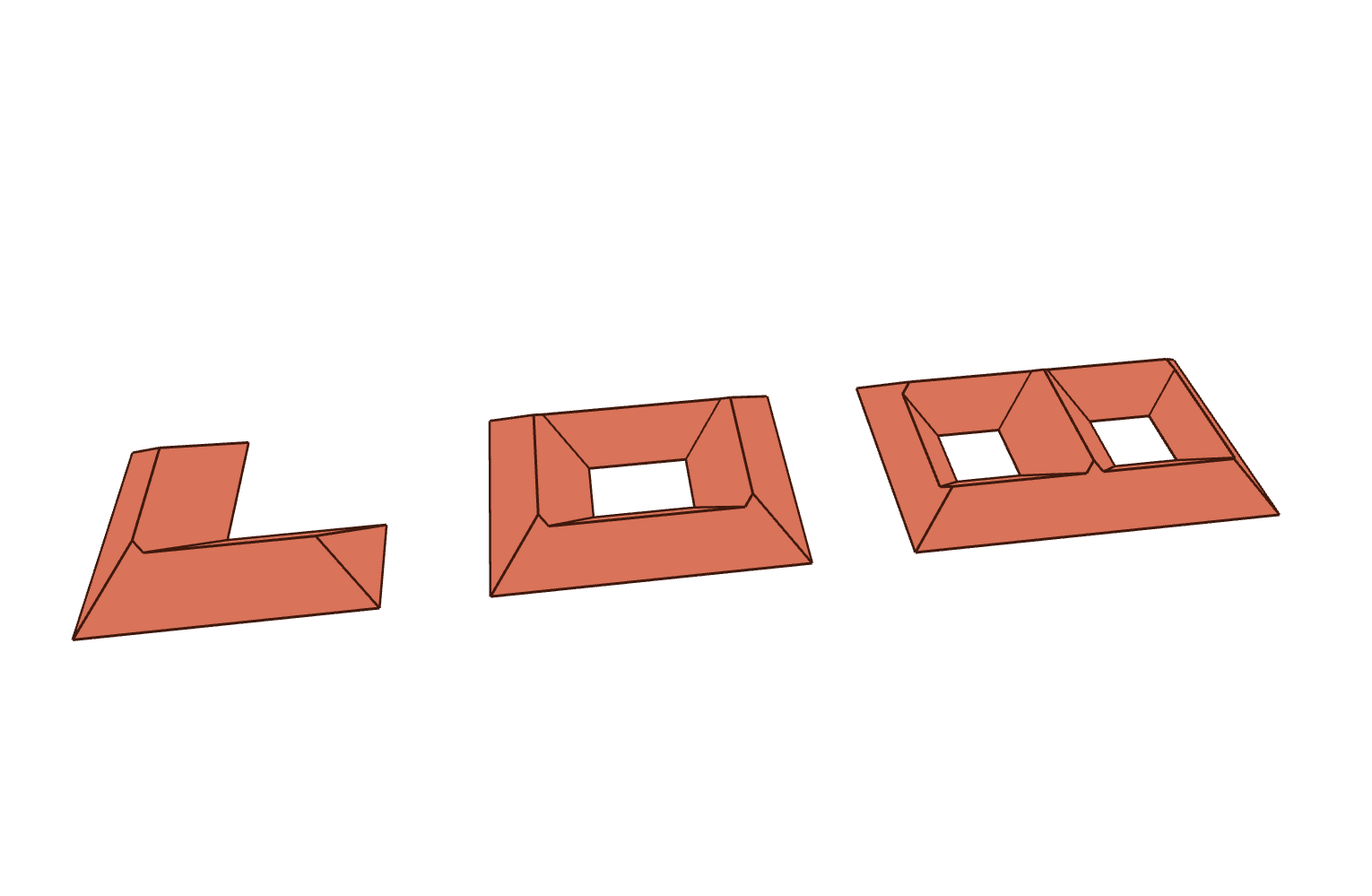
This example demonstrates how to extrude a 2D polygon into a closed 3D roof mesh using
the straight skeleton, powered by CGAL's extrude_skeleton
(see also this overview of the improved straight skeleton).
This is particularly useful for quickly generating roof geometry from building footprints.
The example builds a small "street" of three roofs, covering a few corner cases:
- a simple footprint without holes (an L-shaped hip roof),
- a footprint with a single hole (a courtyard),
- a footprint with multiple holes (two courtyards).
Key Features:
- Turning a building footprint (polygon, optionally with holes) into roof geometry
- Controlling the roof pitch with a taper
angle(in degrees) or straight skeletonweights - Optionally capping the roof with a
maximum_heightto create a truncated roof
extrude returns everything needed to visualize the roof: a triangulated, ready-to-display
mesh (so even non-convex roof faces render correctly) and the roof outline as a list of lines
(the eaves, hips and ridges). The example simply adds the mesh with hidden edges and draws the
outline on top:
mesh, lines = extrude(footprint, holes=holes, angles=45.0)
viewer.scene.add(mesh, show_lines=False)
for line in lines:
    viewer.scene.add(line)
The propagation speed of each contour edge determines the slope of the corresponding roof
face. A uniform taper angle of 45 degrees (equivalent to a weight of 1) produces a
standard hip roof. Smaller angles give flatter roofs, larger angles steeper ones. Providing
a maximum_height (required for vertical or outward slopes) truncates the roof at that height.
from compas.geometry import Polygon
from compas.geometry import Translation
from compas_viewer import Viewer
from compas_viewer.config import Config

from compas_cgal.straight_skeleton_2 import extrude

# ==============================================================================
# Three building footprints, covering a few corner cases
# ==============================================================================

# House 1: a simple footprint without holes (an L-shaped hip roof).
footprint_1 = Polygon([(0, 0, 0), (8, 0, 0), (8, 3, 0), (3.5, 3, 0), (3.5, 7, 0), (0, 7, 0)])
holes_1 = []

# House 2: a footprint with a single hole (a courtyard).
footprint_2 = Polygon([(0, 0, 0), (9, 0, 0), (9, 7, 0), (0, 7, 0)])
holes_2 = [[(3, 2.5, 0), (6, 2.5, 0), (6, 4.5, 0), (3, 4.5, 0)]]

# House 3: a footprint with multiple holes (two courtyards).
footprint_3 = Polygon([(0, 0, 0), (11, 0, 0), (11, 7, 0), (0, 7, 0)])
holes_3 = [
    [(2, 2.5, 0), (4, 2.5, 0), (4, 4.5, 0), (2, 4.5, 0)],
    [(7, 2.5, 0), (9, 2.5, 0), (9, 4.5, 0), (7, 4.5, 0)],
]

# ==============================================================================
# Extrude each footprint into a roof. `extrude` returns a ready-to-display mesh
# and the roof outline (eaves, hips and ridges).
# ==============================================================================

houses = [
    (footprint_1, holes_1, -17),
    (footprint_2, holes_2, -6),
    (footprint_3, holes_3, 6),
]

# ==============================================================================
# Visualize
# ==============================================================================

config = Config()
config.renderer.show_grid = False
config.camera.target = [0.0, 1.0, 0.5]
config.camera.position = [-3.0, -22.0, 24.0]

viewer = Viewer(config=config)

for footprint, holes, offset in houses:
    mesh, lines = extrude(footprint, holes=holes, angles=45.0)

    move = Translation.from_vector([offset, -3.5, 0])
    mesh.transform(move)

    viewer.scene.add(mesh, show_points=False, show_lines=False, facecolor=(0.85, 0.45, 0.35))
    for line in lines:
        line.transform(move)
        viewer.scene.add(line, linecolor=(0.25, 0.1, 0.05), linewidth=2)

viewer.show()